
Some requests need input from you before work can continue. The most common are:
- an invoice to approve (see “Approving or rejecting an invoice”)
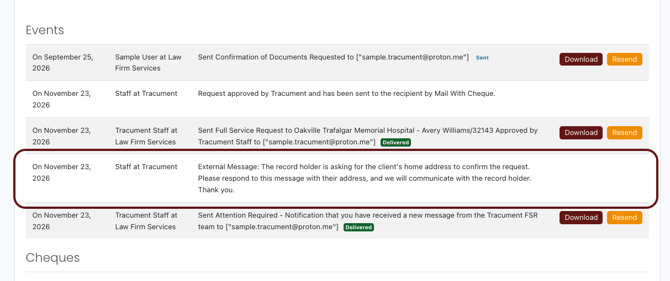
- more information the record holder has asked for, such as a claim number, a health card number, an extra form or a supporting document
All work on the request is paused until you respond.
How you will know
- You receive an email.
- The request moves to the top of Activities → Requests Sent.
- The Matters page shows an Action Required count for each matter, broken down by type.
- To complete actions, go to Activities → Dashboard.

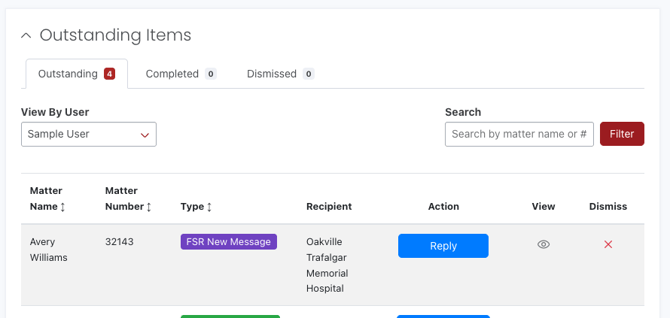
How to respond
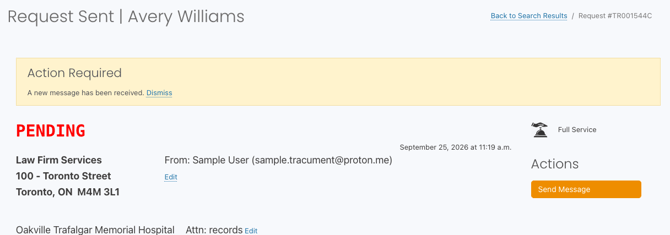
- Open the request and read our message.
- Reply using Send Message, or approve the invoice.
- If you are waiting on your client, tell us in a message so we know it is in progress.
- Once done, click the red Dismiss button on our message to clear it from your Action Required list.
6-week closure policy
- Invoice approved or rejected: Request is closed. Resubmit if still needed
- Requested information provided: Request is closed. Resubmit if still needed
Common questions
I sent the information by email instead of on the request. Is that OK? It works, but please use Send Message on the request where you can, so the information is saved with the request and nothing is missed.
Related articles: “Approving or rejecting an invoice” · “Contacting us about a request”