
Many record holders charge a fee for copies of records. When they do, we upload their invoice to your request for you to approve.
When an invoice arrives
- We upload the invoice to your request, and you receive an email.
- The request moves to the top of Activities → Requests Sent.
- Open the request to view or download the invoice.
- Click Approve or Reject.
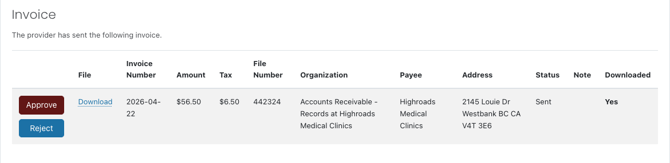
If you approve
- We send payment by mail with cheque on the next business day.
- If the records came with the invoice, they become available to download as soon as you approve the invoice.
If you reject
Include:
- the reason, and
- the amount you are willing to pay, if price is the issue.
If the price is the issue, we will make one attempt to negotiate with the record holder. If they will not change it, we will hand it back to you to discuss with them directly.
Please act quickly
- All work on the request is paused until the invoice is approved or rejected.
- If it is not actioned, we send automated reminders every 3 days.
- After 6 weeks without approval or rejection, the request is closed (see “When we need something from you”).
Where to see the costs
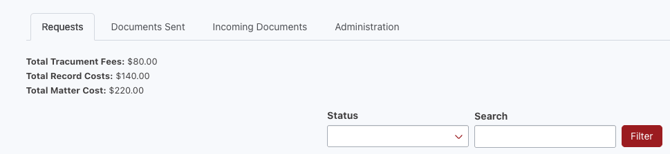
The client's Matter has a Requests tab showing total Tracument fees, total record costs and the combined total for that matter.
Common questions
Can you send me the records now and I'll approve the invoice later? No. When records arrive with an invoice, they are released to you when the invoice is approved.
I can't find the invoice, or I didn't get the email. Check Activities → Requests Sent (requests needing action are at the top) and your spam folder. If it is still missing, send us a message on the request.
There are two invoices on my request. Some record holders invoice separately, for example a prepayment and then a balance. If it looks like a duplicate, send us a message before approving.
Related articles: “Prepayment cheques and GST/HST” · “The record holder says they have not been paid”