
Find your request
- Go to Activities → Requests Sent.
- Requests that need action from you are listed at the top.
- Search by client name, file number or TR number. Click any column title to sort.
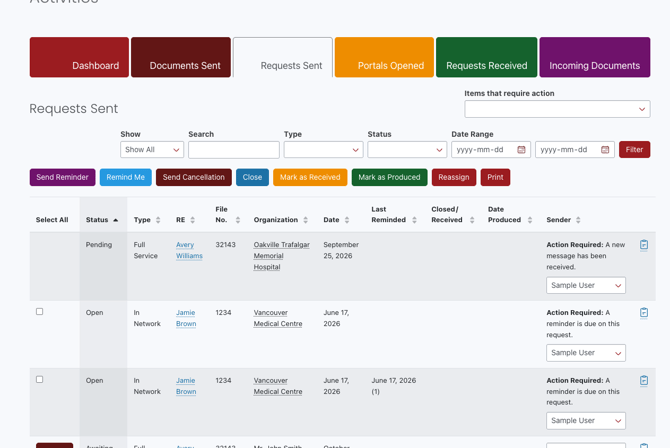
What each status means
- Awaiting Approval
What it means: Our team is reviewing your request (within 1 business day)
Anything for you to do? No - Rejected
What it means: Returned to you with a reason
Anything for you to do? Yes, see “Why was my request rejected, and how do I fix it?” - Pending
What it means: Approved and being sent by fax or mail
Anything for you to do? No - Open
What it means: Sent to the record holder; we are following up
Anything for you to do? No, unless we message you - Received
What it means: Records, or a notice that there are no records, have been uploaded
Anything for you to do? Download the records (see “Downloading your records”) - Closed
What it means: Closed without records, for example after 6 weeks waiting on information or invoice approval
Anything for you to do? Resubmit if still needed - Cancelled
What it means: Cancelled at your request
Anything for you to do? No
See every step in the Events list
Open the request to see its workspace. The Events section is the full history of the request:
- when it was submitted and approved
- every reminder sent, and when
- notes from phone calls and voicemails with the record holder
- messages between you and our team
- invoices uploaded and approved
- records received
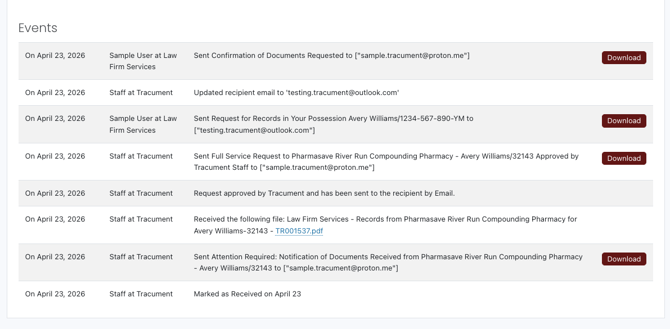
The workspace also shows the record holder's details, the service level, the reminder timeline, any invoice, the files sent to the record holder, and what you asked for (date range, type and notes).
"Nothing has happened for a while"
Record holders often take several weeks. Between scheduled follow-ups there may be no new events, which usually means we are waiting for the record holder. Check the reminder timeline in the workspace for the next scheduled follow-up (see “Choosing a service level: Regular, Accelerated or Urgent”).
Common questions
Can you give me an estimated date? We cannot promise a date, because the record holder controls when records are released. The Events list and reminder timeline show exactly where things stand.
The status says Open but nothing seems to be happening. Open means the request is with the record holder. Check Events for the latest reminder or call note. If the timeline looks behind, send us a message (see “Contacting us about a request”).
Related articles: “How Tracument follows up with the record holder” · “Contacting us about a request”