
Before sending the requests to record holders, our team checks every request so the record holder accepts it the first time. If something would cause the record holder to refuse it, we return it to you with the reason. This saves you weeks of waiting for a refusal from the record holder.
Where to see the reason
- Rejected requests appear at the top of Activities → Requests Sent.
- You also receive an email with the reason.
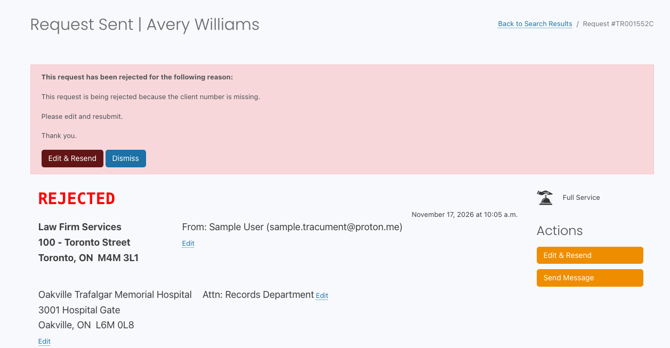
Most common reasons and how to fix them
- Signature unclear, too small, too large or hard to read: Get a clearer signature into the Matter (see “Setting up your client's signature in the Matter”)
- The TRA form was attached as a document instead of the signature being loaded into the Matter: Load the signature into the Matter. Do not attach the TRA form (see “Setting up your client's signature in the Matter”)
- Wrong authorization, or it does not name Tracument as the third party: Use the default authorization, or a custom form naming Tracument (see “Using a custom authorization”)
- Missing information the record holder requires, such as a file number, health card number or claim number: Check the Verified Organization's notes and add the details
- Prepayment missing: Tick Include Cheque with the required amount (see “Prepayment cheques and GST/HST”)
- A non-verified record holder was chosen when a Verified Organization exists: Select the Verified Organization (with the checkmark)
- Urgent or Accelerated chosen where it is not allowed: Choose a permitted service level (see “Choosing a service level: Regular, Accelerated or Urgent”)
How to resubmit
- Open the rejected request.
- Click Edit & Resend.
- Make the changes the rejection reason asks for.
- Submit.
Your corrected request will have a new TR number. Use the new TR number for any questions about it.
Common questions
I don't understand what the reason is asking me to change. Send us a message on the rejected request quoting the reason, and we will explain.
I disagree with the rejection. Send us a message on the rejected request explaining why. We check every request against what the record holder requires, and we will review it with you.
Related articles: “Setting up your client's signature in the Matter” · “Using a custom authorization” · “Changing a request after you submit it”